Meet the new Rapport dashboard
October 31, 2025
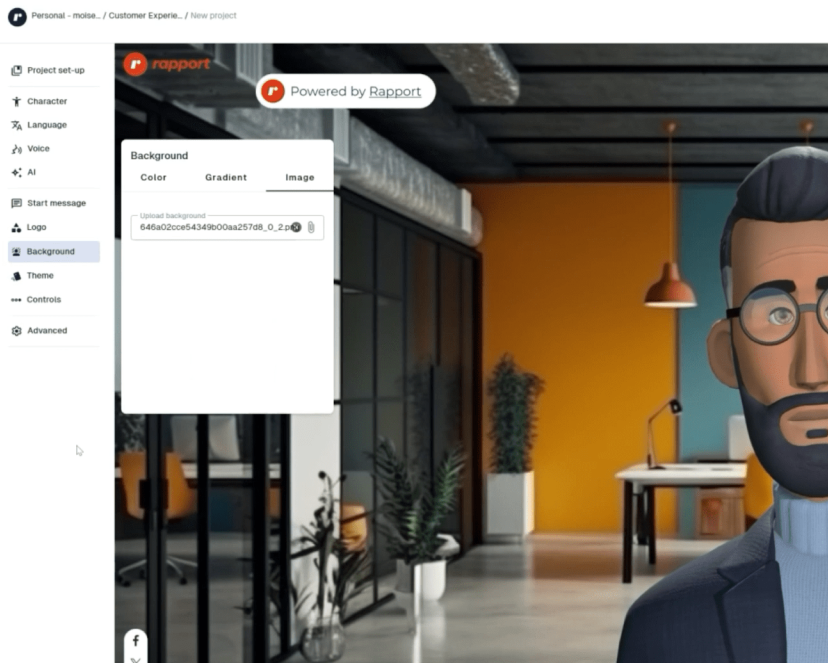
Nothing kills momentum faster than a confusing interface. We’ve all been there, excited to try something new, only to feel stuck wondering, “Now what?” That’s the problem the new Rapport dashboard is built to solve. Whether you’re creating your first avatar or managing a full library of interactive digital humans, the updated experience helps you move forward with clarity and confidence. No guessing, no overwhelm, no wasted clicks.
What You’ll Notice Right Away
From the moment you log in, the experience feels faster, clearer, and designed to help you focus on what matters most, creating your avatar.
Subscribe to our newsletter
Keep updated with Rapport and receive blog posts direct to your inbox
Navigation that makes sense
The layout puts your most-used actions front and center, so you can find what you need without the guesswork.
A simpler way to build
Step-by-step guidance makes creating digital humans feel intuitive, even if you’ve never done it before. No tech skills required, no steep learning curve.
Everything in one place
From projects to scenarios to previews, your work is easier to manage. You’ll see exactly where things stand, all in one view.
Real-time previews and feedback
Test your simulations as you build them. No switching tabs, no surprises. You can adjust on the fly and see changes instantly.
Why It Matters
Creating interactive role-play experiences shouldn’t be a time suck. You have better things to focus on than fighting with your tools. This update is designed to help you move faster, stay focused, and actually enjoy the process. Whether you're onboarding new team members, simulating customer conversations, or experimenting with conversational AI, the new dashboard helps you get there with less friction.
Explore the Rapport Dashboard Update
Want a quick look at what’s changed? Watch the walkthrough video to get familiar with the new layout or dive in and explore the new experience for yourself.
New Rapport Dashboard Tutorial | Build Talking AI Avatars in Minutes
Related articles
How to write a strong prompt for your AI avatar
Build lifelike real-time characters faster with the updated Rapport Unreal Plugin

How to use avatars for employee training (without losing that human touch)
The fear with AI-led training is that it feels cold and scripted. Interactive avatars work best when they add reps and realism without replacing the human coaching around them, and here's how to strike that balance.